Screenshots

WiFi Connected

Ethernet Connection

No Connection
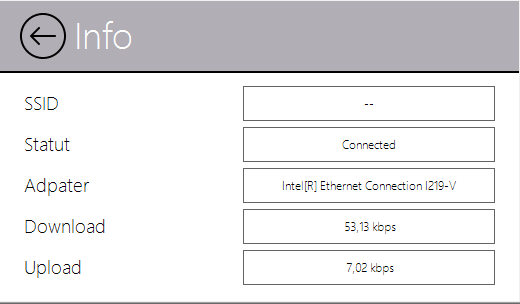
Connection Info
A .NET NuGet control to monitor WiFi, Ethernet and Internet connection status in real time within your WinForms applications.
Download Demo SampleInstall the NuGet package and add the control to your form.
Download NuGet: NuGet WLanCheck
.NET Framework 4.6.2+ .NET 8.0 .NET 9.0
Multi-framework support — Now targets .NET Framework 4.6.2+, .NET 8 and .NET 9.
Real SSID detection — Displays the actual connected WiFi network SSID instead of the Windows profile name.
Real adapter detection — Shows the actual Ethernet adapter name and connection name instead of generic labels.
Memory leak fixes — Proper cleanup of native WLAN API handles. Fixed BackgroundWorker disposal issue.
Optimized P/Invoke — Reduced redundant native API calls for better performance.
Configure the control appearance and behavior:
Add the custom control to your project and initialize:
WiFi Connected
Ethernet Connection
No Connection
Connection Info
Copyright (c) 2020 JYL Software
Permission is hereby granted, free of charge, to any person obtaining a copy of this software and associated documentation files (the "Software"), to deal in the Software without restriction, including without limitation the rights to use, copy, modify, merge, publish, distribute, sublicense, and/or sell copies of the Software, and to permit persons to whom the Software is furnished to do so, subject to the following conditions:
The above copyright notice and this permission notice shall be included in all copies or substantial portions of the Software.
THE SOFTWARE IS PROVIDED "AS IS", WITHOUT WARRANTY OF ANY KIND, EXPRESS OR IMPLIED, INCLUDING BUT NOT LIMITED TO THE WARRANTIES OF MERCHANTABILITY, FITNESS FOR A PARTICULAR PURPOSE AND NONINFRINGEMENT. IN NO EVENT SHALL THE AUTHORS OR COPYRIGHT HOLDERS BE LIABLE FOR ANY CLAIM, DAMAGES OR OTHER LIABILITY, WHETHER IN AN ACTION OF CONTRACT, TORT OR OTHERWISE, ARISING FROM, OUT OF OR IN CONNECTION WITH THE SOFTWARE OR THE USE OR OTHER DEALINGS IN THE SOFTWARE.
If you find this control useful, consider supporting further development.